How to extend the range of your home WiFi network
There are several approaches for increasing the range of your home’s WiFi network. Two basic options are:
- use a Wireless Access Point to add additional wireless coverage to your network
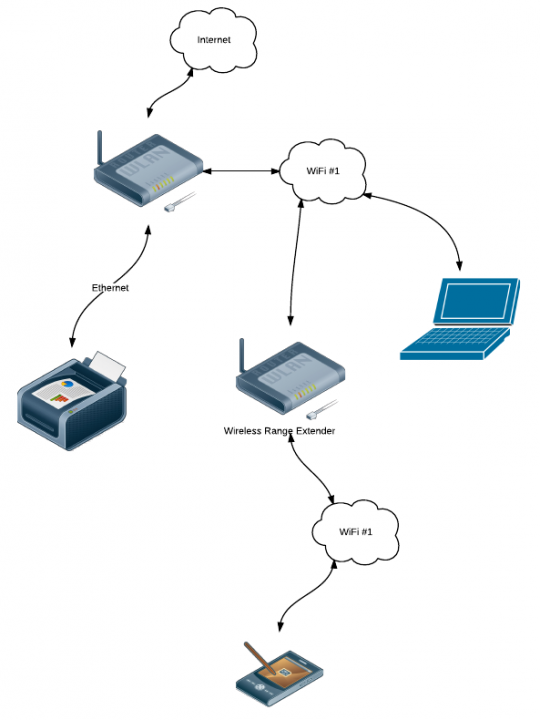
- use a Wireless Range Extender to increase the coverage of your WiFi
They achieve largely the same result, but via two very different methods, and both have their pros and cons.
First up, you need to understand the difference between a Wireless Range Extender and a Wireless Access Point.
A Wireless Access Point is simply a device which allows your devices to connect via WiFi to your network. Your internet router probably has WiFi capabilities, thus it already acts as a Wireless Access Point, connecting your WiFi devices to the network and then to the internet.
Rather than connecting to your home network via the router’s Wireless Access Point, it is possible to move that access point to a different location in the house by connecting a long ethernet network cable to your router, running it to another room, and then connecting a dedicated Wireless Access Point device to the other end of the cable.

Creating a separate WiFi cloud using a Wireless Access Point connected to your router via an ethernet cable
This then creates a second separate WiFi cloud for devices to connect to. Of course, this requires you to either have existing cable installed in the house, or to be able to lay new cable runs through the roof cavity or perhaps under the floor.
If cabling is a problem, an alternative might be to use a paid or Ethernet over Power (EoP) adaptors to utilise your home’s existing power cabling as part of your network. EoP works by having a special power plug adaptor plugged into a power point near your router and connected to it via an ethernet cable. You then have a second of these adaptors in another room also plugged into a power point. The second adaptor is then connected to your Wireless Access Point device via a network cable.

Moving the Wireless Access Point to a new location, connected to the router via Ethernet over Power adaptors rather than a long ethernet cable run
The effectiveness of these adaptors depends on a lot of factors, including the quality of your power cabling, the distance between the adaptors, the amount of interference on the electrical circuits, the number of electrical devices connected to the power and so on. It also requires that the power points used in each room be on the same physical power circuit. Sometimes homes are divided into multiple power circuits, each separately connected to the main power switchboard. In these cases, if the two power points you wish to use are on separate circuits, the EoP adaptors might not work at all.
This solution using Ethernet over Power and a separate Wireless Access Point is what I currently use in my house to create a second WiFi cloud for me to access the network and internet. I use a pair of NetComm NP210 Ethernet over Power adaptors to extend my “physical” network to an old Billion 7401VGP R3 router which is configured to act purely as a Wireless Access Point rather than a router.
The other alternative to using Wireless Access Points is to simply attempt to extend the coverage of your existing WiFi network by using a Wireless Range Extender.
Extenders are simply a form of “repeater” in that they listen for WiFi signals and then just repeat what they find to whomever is listening.
Wireless Range Extenders are generally much easier to set up than a separate Wireless Access Point, since there is no need to run additional ethernet cabling or rely on solutions such as Ethernet over Power to make it work.
The main downside with range extenders is that the extender itself must still be within range of the existing WiFi network (ie your router). It must be able to see the wireless signals coming from your router’s wireless access point so that it can then “repeat” them out over the range it covers itself.
This potentially limits the usefulness of a range extender in some situations where the desired range is too far for the combined router plus extender networks to reach.
Sydney Harbour Bridge
As seen from Kirribilli
This was posted directly from my Nokia N900 using the Pixelpipe photo sharing service. This note added later using WordPress for N900.
Nokia N900
Just bought myself a Nokia N900 mobile computer.
This blog post was written using the MaStory application on the N900.
Works well!
Dragonfly
Adelaide Zoo
I had to fly over to Adelaide to take care of some business, so I thought I’d take an early flight to give me a few hours at Adelaide Zoo to get some photos.
Unfortunately it started raining just as I arrived, and got steadily heavier until it was bucketing down at one point – I had to find shelter in the large Rotunda with all the bored school kids and bedraggled teachers.
My main goal was to get some general photos of the zoo itself and of the various enclosures for discussion on ZooChat – so the fact that it was not ideal conditions for photographing animals wasn’t actually that much of an issue. I was able to get some fairly decent photos of the zoo, even if they are a bit dull and lifeless – at least there wasn’t many people around to get in the way! It was a little awkward taking photos with the DSLR in one hand and an umbrella in the other – but I managed.
Ever since they built them a few years ago I’ve liked the toilet block / bird aviary – although it is a little disconcerting to have a large Cockatoo staring at you while you are trying to do your business.
With the zoo being fairly quiet (weekday and raining), I was able to take the opportunity to spend some time in the nocturnal house taking photos with long exposure times. I set the camera up on the flat area of the fence around the Bilby enclosure, and then with the wide-angle lens looking across the room I tried a number of different settings (without using the flash) to see what I could capture. The Bilby’s were mostly cooperative – they were too busy eating to hop around – but I didn’t even bother with most of the other animals who were all too active to show up in a long exposure photo. The photo below is one I thought worked quite well from only a half-second exposure at 10mm focal length.
I will be uploading more photos to the Adelaide Zoo Photo Gallery on ZooChat.
Tweets from today
- In Murray Bridge visiting my parents
- 22nd September, 2008 6:59 PM from web
- heading up the freeway to Murray Bridge
- 22nd September, 2008 4:30 PM from web
- in Adelaide briefly taking care of some business. Miserable weather :(
- 22nd September, 2008 1:48 PM from web